Best Free Notion Alternatives in 2026 That Actually Work

Most "best Notion alternatives" lists recommend tools that cost $15 to $30 a month and call it a day. That is not what this article is.
Every tool on this list has a genuinely usable free tier — not a 7-day trial, not a crippled version with 5 pages, but a plan you could realistically use as your primary workspace without spending anything. We evaluated each one against the specific reasons people leave Notion: slow load times on large workspaces, data stored on someone else's servers, pricing that jumps fast when you add team members, and complexity that takes weeks to navigate before it becomes useful.
Here is what we found.
Why People Look for Notion Alternatives
Notion is an excellent tool. We have reviewed it extensively — if you haven't read our Notion review for 2026, it covers the full picture. But there are specific, legitimate reasons people look for alternatives:
- Notion loads slowly on large workspaces. Search speed benchmarks across 500+ page workspaces show Notion averaging 2.1 seconds — compared to 0.3 seconds for local-first tools. If you have years of notes, that friction compounds every day.
- Notion stores your data in the cloud on Notion's servers. For users who want their notes on their own device, that is a non-starter regardless of how good the features are.
- Notion's pricing jumps when you need guests or team features. The free plan caps at 10 guests. The Plus plan at $10/month is reasonable, but teams paying per seat find costs escalate quickly.
- The learning curve is real. Most users take one to two weeks before Notion's structure clicks. Some never find a setup that works for their specific workflow and end up with an elaborate workspace they maintain but don't use.
The right alternative depends on which of these problems you're actually trying to solve.
Quick Comparison Table
| Tool | Free Tier | Best For | Offline? | Data Ownership |
|---|---|---|---|---|
| Obsidian | Full app, unlimited notes | Personal knowledge, research | Yes — fully | Local files |
| ClickUp | Unlimited members, tasks | Team project management | Limited | Cloud |
| Anytype | Full local app | Privacy-first, local-first | Yes — fully | Local/encrypted |
| Logseq | Full app, unlimited | Outliner-style, developers | Yes — fully | Local files |
| Coda | Limited doc size | Spreadsheet-style databases | No | Cloud |
| AppFlowy | Full open-source app | Open-source, self-host | Yes | Self-hosted |
| Microsoft OneNote | Unlimited | Simple notes, Microsoft users | Yes | Microsoft cloud |
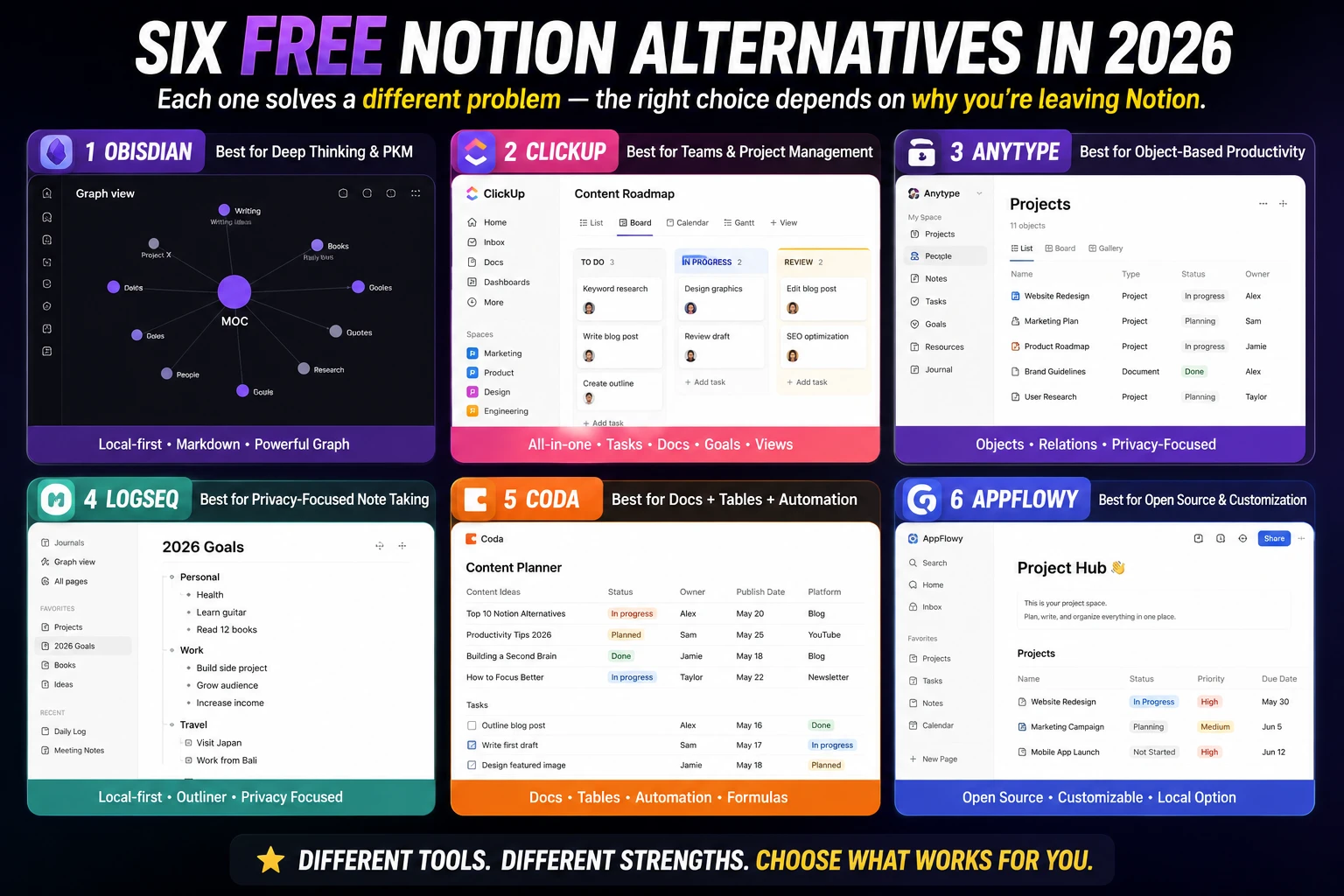
1. Obsidian — Best Free Alternative for Personal Knowledge
Free tier: Complete app, unlimited notes, no feature limitations
Best for: Solo users, researchers, writers, students
The best overall free alternative in 2026 is Obsidian. That assessment holds up when you evaluate it against what people actually need from Notion.
Obsidian stores every note as a plain Markdown file on your device. Your notes live as markdown files on your device — no lock-in, no cloud dependency. That means full offline access always, search that returns results in 0.3 seconds regardless of workspace size, and notes you can open in any text editor in 2046 without worrying whether the company still exists.
The bidirectional linking — type [[note name]] anywhere to link two notes, and both notes show the connection — creates a network of ideas that surfaces relevant information when you're working on something new. The graph view visualizes this network. For researchers, writers, and students building knowledge over time, this is genuinely different from anything Notion does.
Obsidian and Logseq are the best completely free Notion alternatives for personal use.
The free tier covers the complete app with no feature caps. The only paid add-ons are Sync ($8/month for encrypted cross-device cloud sync) and Publish ($16/month for making notes public). If you work on one device, Obsidian costs nothing.
The honest limitation: No real collaboration. Sharing a vault with another person requires workarounds through Dropbox or iCloud. If you need multiple people editing the same workspace, Obsidian is the wrong tool.
Migration from Notion: Notion exports to Markdown, which Obsidian reads natively. Migration effort from Notion to Obsidian is approximately 2 hours — the lowest of any major alternative because Obsidian is Markdown-native.
For a full head-to-head between these two tools, see our Notion vs Obsidian comparison.
2. ClickUp — Best Free Alternative for Teams
Free tier: Unlimited members, unlimited tasks, 100MB storage
Best for: Teams, project managers, anyone leaving Notion for task management
The best team alternative in 2026 is ClickUp. ClickUp's Free Forever plan supports unlimited team members — a significant advantage over Notion's 10-guest cap on the free plan.
ClickUp does everything Notion does — docs, wikis, databases, Kanban boards, calendars — and adds significantly deeper project management features. Native time tracking, timesheets, workload views, custom roles, and a more powerful automations engine are all available on paid tiers, with the core features accessible free.
ClickUp Docs are capable enough for most team documentation needs. The block editor, nested pages, and slash commands work similarly to Notion. Where ClickUp pulls ahead is the surrounding project management: tasks with subtasks, dependencies, custom statuses, and time estimates are all more developed than Notion's task handling.
Satisfaction scores after 7 weeks of use: product teams rate ClickUp 8.6/10. Writers and solo users rate it 6.4/10. That split is telling. ClickUp is excellent for structured team work. It is more complex than necessary for personal note-taking or creative writing.
The honest limitation: ClickUp has more features than most people will ever use. The interface reflects that comprehensiveness. Getting a ClickUp workspace configured for your team takes real time — onboarding to productivity parity takes approximately 5 days.
3. Anytype — Best for Privacy and Local-First
Free tier: Full local app with all features, currently in open beta
Best for: Privacy-focused users, anyone who wants local data with encryption
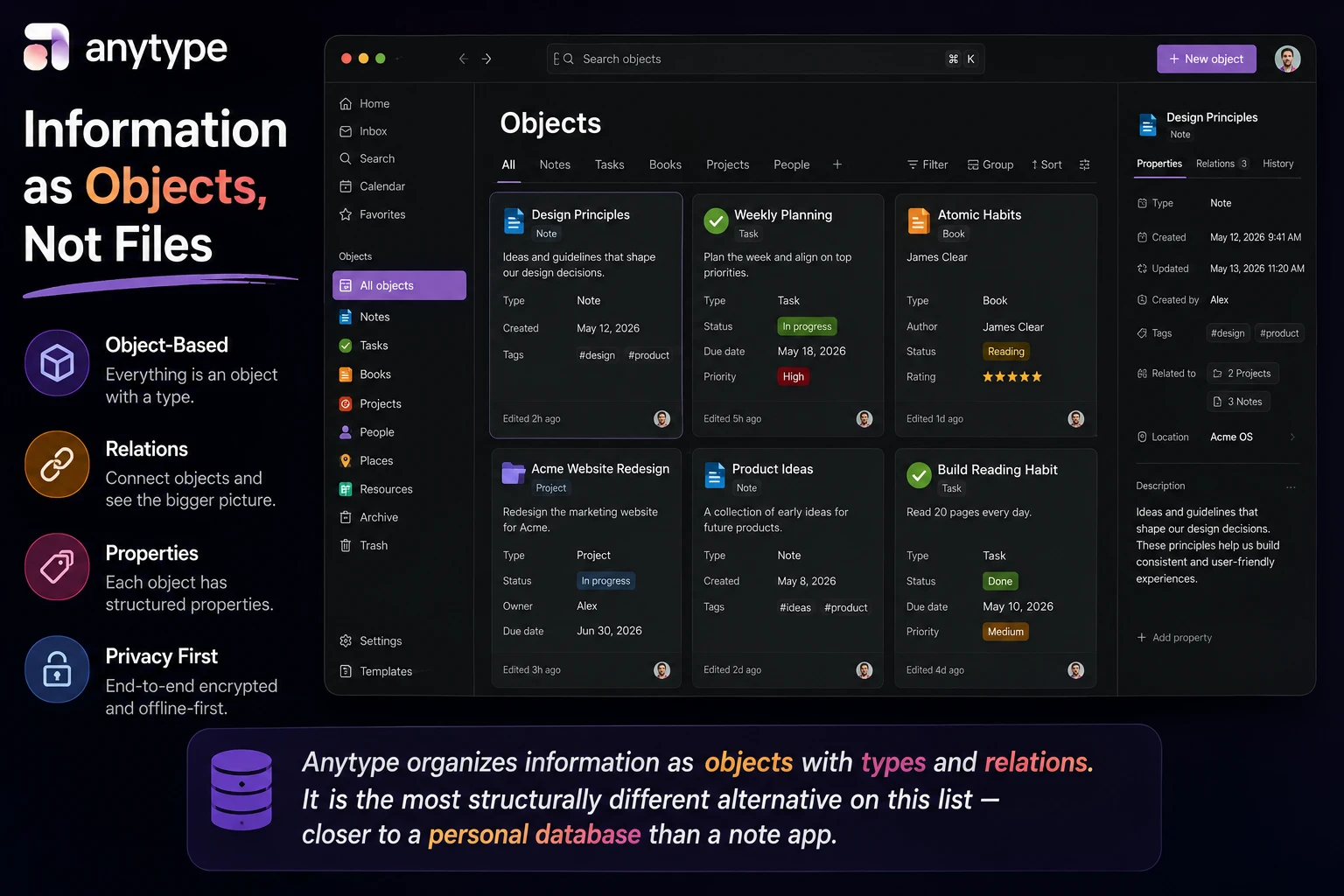
Anytype is the most privacy-focused option — it's end-to-end encrypted, local-first, and open-source.
Anytype's approach is fundamentally different from both Notion and Obsidian. Rather than pages and databases, Anytype organizes information as "objects" with types — a note, a task, a person, a book, a project. Each object can have properties and relations to other objects. The result is a more structured alternative to Obsidian's pure Markdown approach while maintaining local-first storage.
Anytype is currently free during its beta period, with a local-first architecture and end-to-end encryption. The team has committed to maintaining a generous free tier for personal users.
If your reason for leaving Notion is specifically data ownership and privacy — you do not want your notes on a company's servers under any circumstances — Anytype is the most complete alternative that also offers collaboration features, which pure Obsidian does not.
The honest limitation: Anytype is still in active development. Features that Notion has refined over years are still being built. The interface has improved significantly in 2025 and 2026 but remains less polished than Notion for everyday use.
4. Logseq — Best for Outliner-Style Thinking
Free tier: Full app, unlimited pages, completely open-source
Best for: Developers, researchers, anyone who thinks in outlines
Choose Logseq if you're a developer or researcher who thinks in outlines and wants free, open-source software.
Logseq takes Obsidian's local-first Markdown approach and combines it with an outliner interface — every note is structured as a hierarchical bullet list rather than a free-form page. If you naturally think in nested structures and find that Notion's pages feel too unstructured, Logseq's outliner format clicks faster.
Like Obsidian, Logseq stores notes as local Markdown files. Bidirectional linking works the same way. The graph view visualizes connections between notes identically. The meaningful difference is the editing interface: Logseq's outliner vs Obsidian's open canvas.
Search speed on 500+ page workspaces: Logseq returns results in 0.4 seconds — second only to Obsidian's 0.3 seconds. Both are dramatically faster than Notion's 2.1 seconds on equivalent workspace sizes.
The free tier is the complete app. The only costs are optional sync solutions — typically a self-hosted or third-party sync service, as Logseq does not sell a Sync add-on the way Obsidian does.
The honest limitation: Onboarding to productivity parity with Logseq takes approximately 4 days — mostly spent understanding how the outliner structure works for daily notes and the graph view for long-term knowledge. Steeper than Coda, flatter than ClickUp.
5. Coda — Best for Database-Heavy Work
Free tier: Unlimited docs, limited rows and objects per doc
Best for: Teams that need spreadsheet-style logic in a document interface
The best free alternative for databases is Coda.
Coda's formulas support advanced cross-table logic, dynamic buttons, and interactive tables that exceed Notion's capabilities, enabling 'docs-as-apps' for data-heavy automations without external tools.
For teams whose Notion usage is primarily structured databases — inventory management, CRM, content pipelines, financial tracking — Coda's formula engine is meaningfully more powerful than Notion's. Teams migrating from Notion report faster performance and native integrations like Slack and Jira via Packs, reducing dependency on third-party services.
Pricing favors creators at $10/month, with free access for viewers and editors. The free tier limits doc size (rows and objects) but is genuinely usable for individuals and small-scale use cases.
The honest limitation: The free tier's doc size limits mean Coda is not a full Notion replacement at zero cost for active users. You will hit the ceiling within a few months of regular use. The paid tier at $10/month is when Coda becomes most compelling. For truly free alternatives, Obsidian or ClickUp are stronger.
6. AppFlowy — Best Open-Source Alternative
Free tier: Complete app, self-hosted or cloud, all features
Best for: Developers, privacy-focused users who want open-source
AppFlowy is the open-source, self-hostable alternative that most closely mirrors Notion's feature set. For users who want a better Notion-shaped tool with open-source principles, AppFlowy is one of the strongest choices.
The interface looks and functions similarly to Notion — block-based pages, Kanban boards, databases. The difference: you can run AppFlowy on your own server, meaning your data never touches a third-party service if you don't want it to. The cloud version is free with no feature limitations.
For developers comfortable with self-hosting, AppFlowy provides the closest Notion-like experience with complete data control at zero cost.
The honest limitation: AppFlowy is less polished than Notion and has fewer templates. The community and plugin ecosystem is growing but smaller than Notion's. Some features that work seamlessly in Notion require more manual setup in AppFlowy.
How to Choose the Right One
The best alternative is the one your team will actually use.
Run through this decision quickly:
- You want to own your notes permanently on your own device: Obsidian (solo) or Anytype (with some collaboration).
- You need team project management alongside notes: ClickUp free tier covers everything Notion does for teams at no cost.
- You think in outlines and are comfortable with a learning curve: Logseq.
- You need spreadsheet-level database power in a doc interface: Coda — but budget for the $10/month paid tier eventually.
- You want the closest thing to Notion but open-source and self-hostable: AppFlowy.
- You're leaving Notion because it's slow on a large workspace: Any local-first tool fixes this. Obsidian and Logseq search in under 0.5 seconds regardless of workspace size.
One practical note: no single tool replaced Notion for all user profiles in a 2026 comparison test. The most common outcome was a split — ClickUp for tasks and team work, Obsidian for personal notes. Using two focused tools instead of one all-in-one is a valid and often better outcome.
For a detailed head-to-head between Notion and its closest alternative, see our Notion vs Obsidian 2026 comparison. For a full review of Notion itself before you decide to leave it, see our Notion review.
FAQ
What is the best completely free Notion alternative in 2026?
Obsidian and Logseq are the best completely free Notion alternatives for personal use. Both are free forever for the local app with no feature limitations. ClickUp's Free Forever plan is the best free alternative for teams.
Which Notion alternative works fully offline?
Obsidian, Anytype, and Logseq all work fully offline. They store data locally on your device, so you're never dependent on an internet connection to access your notes. ClickUp and Coda require internet access for most functions.
Is there a Notion alternative with no data stored in the cloud?
Yes. Obsidian, Logseq, and Anytype all store data locally by default. Anytype adds end-to-end encryption. AppFlowy can be self-hosted with no third-party cloud involvement. These are the strongest options if data ownership is the primary concern.
How long does migrating from Notion take?
Migration effort varies by tool: Obsidian takes approximately 2 hours (Markdown-native import), Coda takes approximately 4 hours, and ClickUp takes approximately 6 hours including reconfiguration. Notion's export to Markdown format makes the transition to Obsidian or Logseq the most straightforward.
Is ClickUp really free for teams?
Yes. ClickUp's Free Forever plan supports unlimited team members and unlimited tasks. The main free tier limitations are 100MB storage and limited dashboard and reporting features. For most small teams, the free plan covers daily operations without needing to upgrade.
Can I use multiple Notion alternatives at once?
Yes — and it is often the most practical outcome. A common 2026 setup is ClickUp for team task management and Obsidian for personal knowledge. Using two specialized tools instead of forcing one all-in-one to handle everything often produces better results than finding a single replacement.
We update this list when pricing or features change significantly. Last updated: June 8, 2026.
Which Notion alternative are you using — and what made you switch? Share it in the comments.
📬 Get the Latest Reviews in Your Inbox
Once a week — AI tools, SaaS & gadget reviews delivered straight to your email.