Is Notion AI Worth It for Small Teams in 2026?

✅ Pros
- +Replaces docs, tasks, CRM, and wikis in one workspace | Ask Notion finds anything across your entire history | Meeting summaries go from 40 minutes to under 5.
❌ Cons
- -Full AI locked behind $20/user Business plan | First two weeks are genuinely difficult | No offline editing — connection drops lose work | Mobile app is noticeably worse than desktop | No native time tracking built in
Most Notion reviews online fall into one of two categories. The first type is written by someone who spent a weekend clicking around the free plan and called it a review. The second type reads like it was written by Notion's marketing team — every feature described as revolutionary, no honest mention of the learning curve that makes the first week feel like a mistake.
This is neither of those.
We ran Notion AI with a six-person content agency for eight weeks. Real client work, real deadlines, real team members who pushed back when something did not work. Two of them genuinely hated it for the first twelve days. Here is what actually happened.
Quick Summary
Rating | 8.3 / 10 |
Price | Plus $10/user/month — Business $20/user/month |
Best for | Small teams managing clients, projects, and docs together |
Not for | Teams that only need a simple task list |
Free plan | Yes — unlimited pages, no credit card |
Try free | notion.ai |
The Setup Nobody Warns You About
Week one was not fun. I will not pretend otherwise.
Moving a six-person team off four separate tools — Trello for projects, Google Docs for writing, a spreadsheet CRM, and a growing mess of Slack pinned messages that nobody could ever find — took longer than any productivity article about Notion will tell you.
We spent the first three days just deciding what our workspace structure should look like. How many databases? What fields matter for client tracking? Who gets access to what? Notion does not make these decisions for you. That is both its strength and the reason your first week will feel slower than before.
By day five, our project manager sent a message that said, and I am quoting directly: "I genuinely think we made a mistake."
By day fourteen, that same person was training a new client on how to use our shared Notion workspace.
That turnaround is the real Notion story. But the two weeks in between are real, and you should plan for them.
What Notion AI Actually Does in 2026
Notion has shipped significant AI updates since 2024. The tool in 2026 is not the same as what most older reviews describe.
Two features changed how our team actually works:
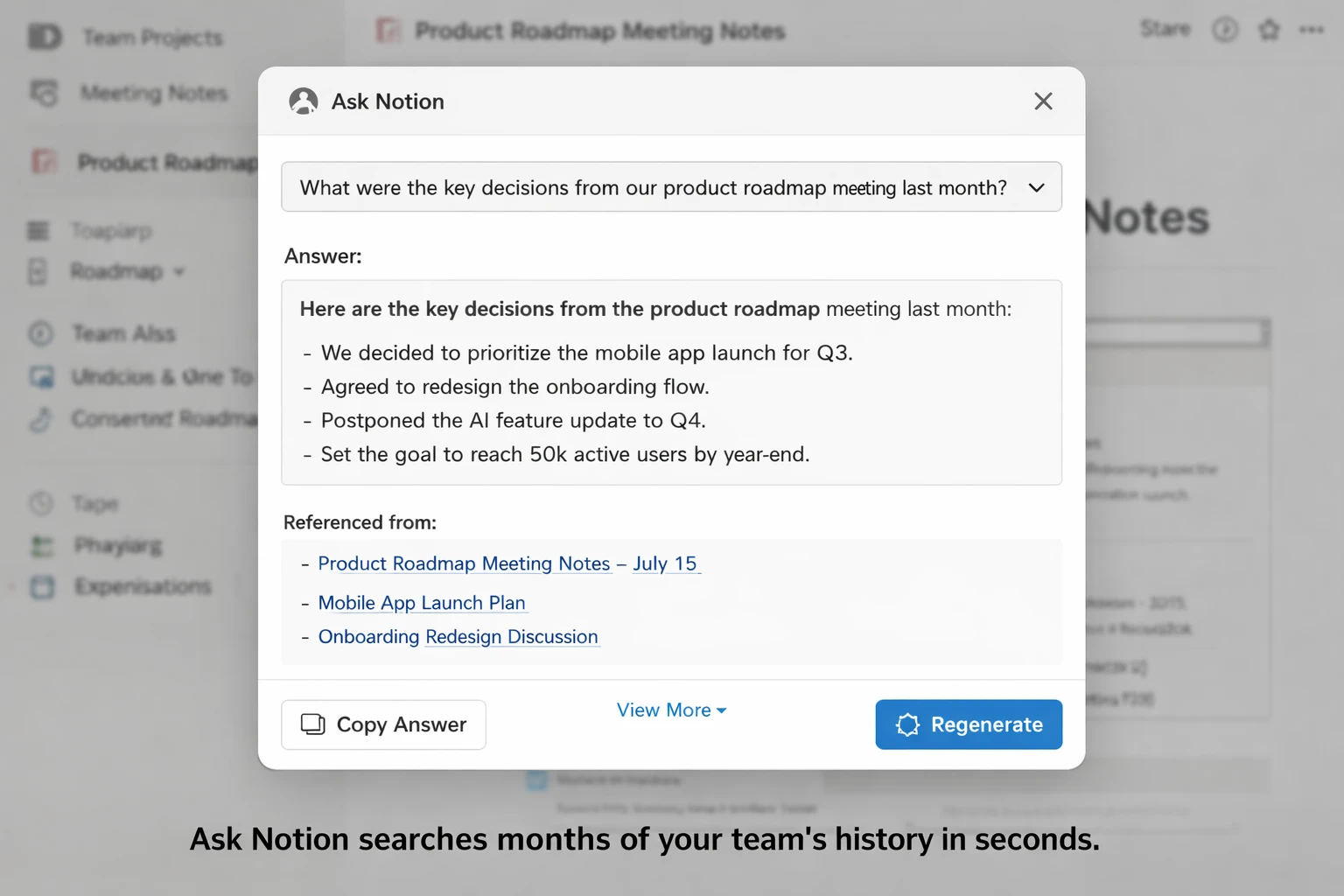
Ask Notion lets you query your entire workspace in plain language. You type something like "What did we agree on for the Henderson account in April?" and it searches every page, database entry, and linked document your team has ever created, then returns an answer with source references you can click through.
For a team that has been in Notion for more than three months, this becomes how you find anything. No more scrolling through old meeting notes. No more asking a colleague if they remember what was decided six weeks ago. You just ask.
AI Agents take actions on your workspace automatically. You can instruct an agent to create a project brief from a meeting summary, draft a client onboarding checklist from your CRM database, or compile a weekly status report across all active projects. These are not toys. For the right workflow, they save hours.
Both features require the Business plan at $20/user per month. We will talk about whether that price makes sense later.
Eight Weeks of Real Work: What Changed
The thing that sold the whole team
Our weekly Monday sync used to produce a 40-minute documentation task. Someone had to write up what was decided, who owned what, what was blocked, and what the next steps were. It was nobody's favorite job and it showed — the notes were inconsistent, sometimes missing, occasionally just wrong.
We started pasting the raw meeting notes into Notion and running a single AI summary request. Time dropped to four minutes. Action items linked automatically to the relevant project pages. The person who previously owned the documentation task is now vocal about never going back.
That one change, in week three, is when the team stopped questioning the switch.
The client CRM we built and actually use
By week four, we had a client database with fourteen fields — contact info, project type, retainer amount, contract renewal date, active status, linked project pages, and a running notes section that pulled from every Notion page tagged with that client's name.
Three filtered views: a table for data entry, a gallery for quick visual scanning, and a filtered list showing only clients with renewals in the next thirty days.
Before Notion, this information lived in a spreadsheet nobody kept fully updated, a folder of Google Docs nobody could find, and the memory of whoever had been on that client the longest. The Notion version is not perfect. But it is real and everyone uses it.
Where the AI genuinely helped
Beyond meeting summaries, the AI autofill feature in databases saves consistent time. Add a new company to the CRM, tell AI to fill the description and industry fields, and it pulls from public information and populates them in seconds. Not always perfectly accurate — we edited maybe 30 percent of the entries — but accurate enough to eliminate the manual lookup time entirely.
First-draft generation for internal documents worked well. Project proposals, onboarding checklists, content briefs — the AI produced usable starting points that needed real editing but saved the blank-page problem. For client-facing writing, we still use dedicated tools. If your team needs serious short-form content generation, our Rytr review covers a $9/month tool that handles that specific job better than Notion AI does.
Notion AI vs. The Tools It Replaces
Against Trello
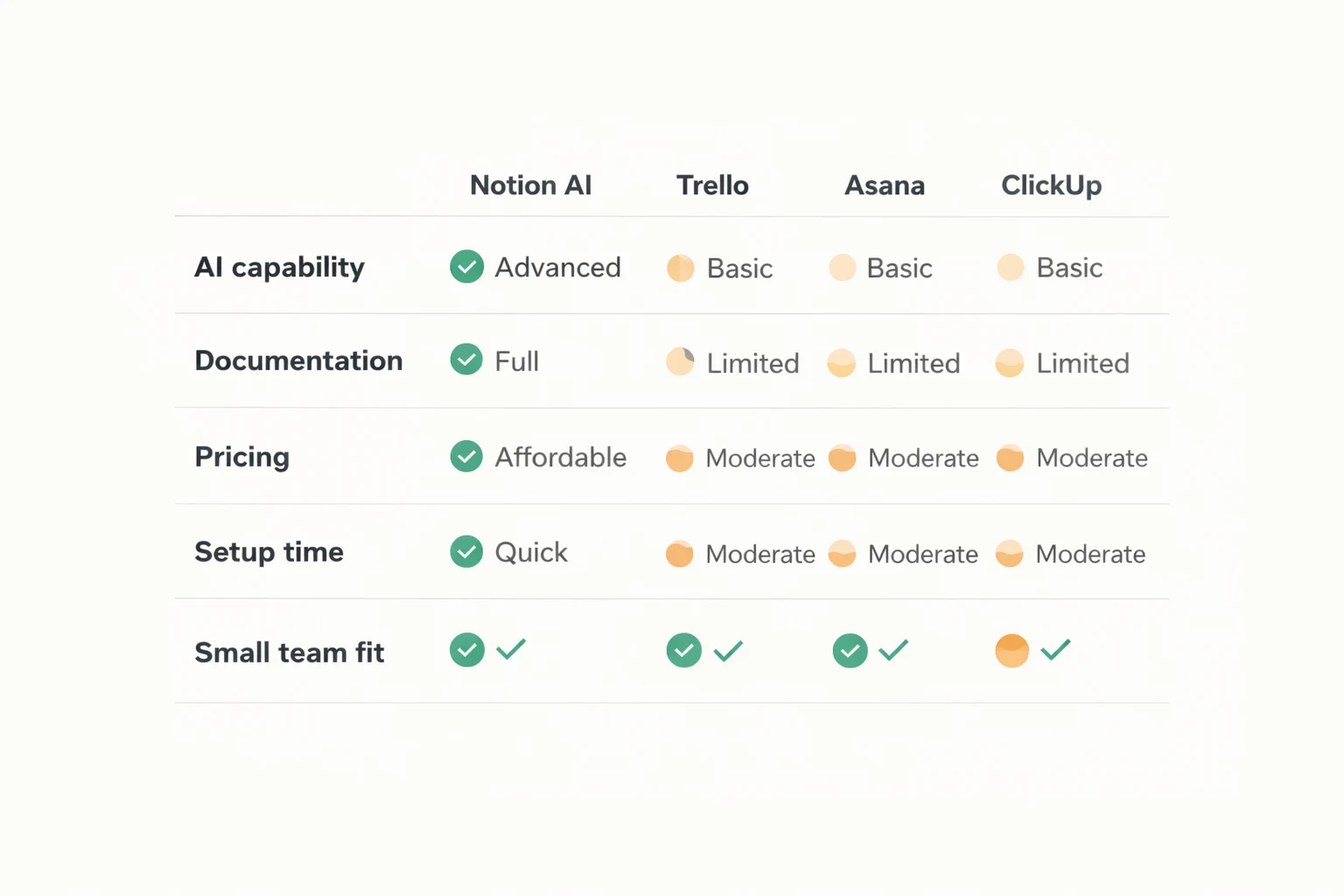
Trello is still the cleanest Kanban board available. If your entire workflow fits into columns and cards — nothing more — Trello is faster to set up, cheaper to run, and easier to hand to a new hire on day one.
The gap opens when you need context attached to tasks. In Trello, a card says "Write Q3 blog post." In Notion, that card opens the actual draft, the client brief, the feedback thread, and the deadline in one view. For content teams and agencies, that connection is the difference between a task tracker and a real workspace.
Against Asana
Asana is a stronger pure project management tool. Gantt charts, workload views, sprint management, and dependency tracking are all more developed than what Notion offers natively. Teams running structured software development or multi-team enterprise projects will find Asana more purpose-built.
Notion pulls ahead on knowledge management by a significant margin. Asana has no equivalent to Ask Notion, no document structure that can serve as a client wiki and a project tracker simultaneously, and no AI that works across the full workspace history. For agencies and content teams, that gap matters more than Asana's PM depth.
Against ClickUp
ClickUp tries to be everything Notion is plus a dedicated project management tool. On paper that sounds like a win. In practice, the result is a tool that takes longer to configure than either Notion or a traditional PM tool, and that many teams configure once and never fully revisit.
Notion AI in 2026 is better for writing, documentation, and knowledge work. ClickUp is better if you need native time tracking, goals tracking, and sprint management without additional tools. For a team that writes more than it manages sprints, Notion is the cleaner choice.
For more hands-on comparisons across the major SaaS productivity tools, see our full SaaS tool reviews.
Pricing: The Honest Breakdown
Plan | Cost | What the AI Does |
Free | $0 | Basic AI trial access |
Plus | $10/user/month | Writing help, summaries, grammar |
Business | $20/user/month | Ask Notion, AI Agents, full workspace AI |
Enterprise | Custom | Everything plus compliance controls |
The pricing shift worth knowing: Notion eliminated the separate $10 AI add-on in 2025 and moved full AI into the Business plan. A six-person team on Plus with the old AI add-on paid $108/month. The same team on Business now pays $120/month. Not a dramatic increase, but the features you are paying for jumped significantly — Ask Notion and AI Agents were not part of the old add-on.
For our six-person agency, $120/month replaced tools that previously cost $147/month combined. The math worked. For a two-person team, $40/month for tools you might only partially use requires a more honest evaluation of whether the AI features will get real use in your workflow.
What Notion AI Still Gets Wrong
No offline access. This is not a minor limitation. Editing requires a live internet connection. We lost work twice in eight weeks when connections dropped mid-session and the sync failed. If your team works regularly in low-connectivity environments — traveling, working from locations with unreliable wifi — this is a genuine problem that compounds over time.
The Business plan gate. The features that make Notion AI genuinely powerful for small teams — Ask Notion and AI Agents — are locked behind $20/user. The Plus plan AI is useful but limited. Testing the real product requires committing to the higher price first, which is an awkward position for a team that wants to evaluate before spending.
Mobile is noticeably behind. Reading pages, checking tasks, and capturing quick notes on mobile works fine. Editing complex databases, navigating a large workspace, or formatting a long document on a phone is noticeably slower and more frustrating than the same actions on a desktop. For a fully mobile team, this matters more than it did for us.
No native time tracking. We added Toggl. It integrates cleanly enough. But it is an extra tool, an extra cost, and one more thing to onboard new team members on. For agencies that bill hourly, this is a real gap.
The first two weeks cost real productivity. This is not a complaint — it is information for planning. Budget the setup time honestly before you start the migration.
Who Should Actually Switch
Switch if your team manages knowledge, documents client relationships, writes together, and regularly needs to find decisions made weeks or months ago. The AI layer improves with use — after three months of real data in your workspace, Ask Notion becomes a genuinely different tool than it is on day one.
Do not switch if you primarily need to track who is doing what and by when. Trello at $5/user or a shared spreadsheet will serve that job at lower cost with no setup friction.
Start with the free plan. Two weeks of real work — not exploration, actual work — will tell you whether the structure fits how your team operates. If you are still reaching for it on day fourteen, Business at $20/user is defensible math against the alternative tool stack.
If you are a student looking for tools to pair with Notion for academic work, our guide to best free AI tools for students in 2026 covers what complements it well at no cost.
Two weeks of frustration followed by a tool your team cannot imagine working without. That is the honest Notion AI arc for small teams in 2026. The setup cost is real. The payoff, for the right kind of team, is also real.
Disclosure: Some links in this post are affiliate links. https://www.techvaultai.com/ a small commission if you sign up through them, at no extra cost to you. We paid for the Notion Business account used in this review. No free access, no sponsorship, no early preview was provided by Notion.
Posted by the Tech Vault AI editorial team
✅ Bottom Line
Notion AI in 2026 is the best all-in-one workspace for small teams doing knowledge-heavy work. After that, it replaced four tools and cut our documentation time by 85%. The $20/month Business plan is expensive — but hard to walk away from once it is working.
📬 Get the Latest Reviews in Your Inbox
Once a week — AI tools, SaaS & gadget reviews delivered straight to your email.